Free tool
Pool Robot Finder: Which Robotic Pool Cleaner Fits Your Pool?
Pick your pool type and what you need cleaned. We'll show the robots and skimmers whose published specs fit, and flag any recalls.
- Choose inground or above-ground and the size
- Tick what you need cleaned
- See every robot and skimmer that fits
Backyard Bot HQ is reader-supported: we may earn a commission when you buy through links on this site, at no extra cost to you. As an Amazon Associate I earn from qualifying purchases.
Pick your pool type, its length, a budget and the parts of the pool you need cleaned, and the tool lists every pool robot and solar skimmer in our database whose published specs fit, cheapest first. A model with a recall of its own gets a recall flag, so you see it before you click through.
Use the match list to narrow the field to a few models, then open each model page, and read any recall flag before you buy.
How to use it
- Pool type. Inground or above-ground.
- Pool length (ft). The longest straight run of your pool. The box starts at 32 ft.
- Budget. A list-price ceiling in dollars, or blank for no limit.
- It must clean. Floor and walls start ticked. Add waterline if scum lines bother you, and surface if floating leaves are your main problem.
- Preferences. “Cordless only” drops corded robots. “Fine filter” keeps only models rated for 100 microns or finer. “On sale now” starts ticked and hides announced models that aren’t selling yet.
The list updates as you change anything.
How to read the matches
The headline counts the matches, and the first eight show right away; a “Show all” button opens the rest. Each line shows the model, its list price, and a short summary: cordless, corded or solar skimmer, what it cleans, its rated runtime and its filter rating in microns when the brand publishes them. Runtimes under 180 minutes show in minutes. Longer ones show in hours, rounded, which is why some solar skimmers read 30 h or more.
If nothing matches, the tool says so and suggests unticking one requirement, or pairing a floor robot with a solar skimmer for the surface.
What the recall flag means
“Recall on record: see model page” appears only when that exact model has a recall on file. A recall of a different product from the same brand doesn’t trigger it.
As of our Nov 21, 2026 check of the CPSC recall database, no model in the tool had a recall of its own, so no flags show. Two brands in the tool have recalled older products, and those show in the Recalls row on their model pages instead:
- Aiper: a Recall Alert for the Elite Pro cordless pool vacuum (Aug 2023, battery overheating) and a recall of the Seagull Pro (Mar 2025, charging adapter overheating).
- Wybotics (WYBOT): a recall of the Osprey 700 Max and S1 (Apr 2026, lithium-ion battery overheating).
Recalls can be posted any day, so search the brand on cpsc.gov before you buy, and again if you’re buying a discontinued model from a third-party seller.
What the tool assumes
- Pool length is the only size test. A model drops out when your pool is longer than the brand’s maximum length. Models that publish only a maximum area in square feet, or no size limit at all, are included, so check their area rating on the model page.
- Pool type only filters models that list one. If a brand doesn’t say inground or above-ground, the model stays in for both. Above-ground owners should confirm fit on the model page.
- Cleaning areas must be published. A model appears only if the brand lists every surface you ticked. A model whose brand doesn’t list what it cleans won’t appear while any box in that group is ticked.
- “Cordless only” keeps solar skimmers. They’re cordless too, though they only clean the surface.
- “Fine filter” needs a published micron rating. Dolphin and Polaris models don’t have one on file, so ticking it removes all of them.
- Budget skips models with no published US list price. They stay in the list as “Price not announced” and sort last. Check the brand’s site for those.
- “On sale now” hides only announced models. Discontinued models that are still sold stay in the list.
Shopping under $500 or $1,000
Set the budget to $1,000 with an inground pool and floor and walls ticked, and you’ll see cordless robots from Aiper, Beatbot and WYBOT next to corded Dolphins. Our Aiper vs Dolphin comparison covers the cordless-or-corded call, and Beatbot vs Aiper puts the two cordless brands head to head.
Under $500 is skimmer territory. The cheapest floor-and-wall robot with a published price in the tool is the WYBOT C1 at $569.99 list on WYBOT’s US store (Nov 2026). At or under $500 you’re looking at solar skimmers: the Aiper EcoSurfer S2 and WYBOT F1 at $399.99 each, and the Betta SE at $469.90 and SE Plus at $499.90 (brand US stores, Nov 2026).
When to double-check the result
- Your pool has an odd shape, a long spa spillover or deep steps. The tool doesn’t know about any of that.
- Your pool is close to a model’s length limit. A 33 ft pool passes a 33 ft rating, with no margin.
- Your main problem is heavy leaf fall. A floor robot alone won’t keep up with the surface. Tick “Surface”, or plan on a skimmer as well.
Bottom line
Run the tool once with only the must-haves ticked, then add preferences one at a time to see what each costs you. When you’re down to two or three, compare them side by side on the pool robot hub.
Pool robots people check most
All pool robots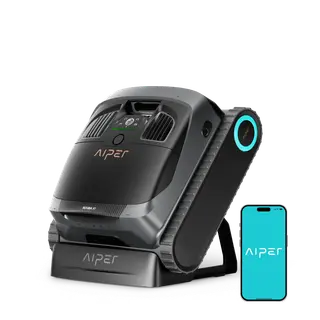 Aiper Scuba X1floor, walls, waterline · 3 hBuy the Aiper Scuba X1 on sale for a mid-size in-ground pool up to 2,150 sq ft; skip it at full list or if lifting 24 lb is hard.$1,500 list
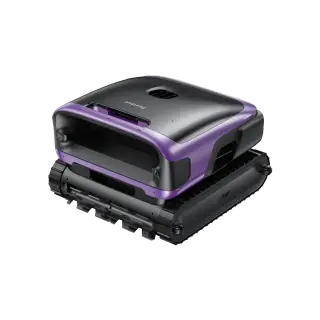 Beatbot Sora 70floor, walls, waterline, surface · 7 hThe Sora 70 is our pick for most pools up to 3,200 sq ft that get floating leaves; skip it for petal-heavy surfaces or if lifting 23 lb is hard.$1,499 list
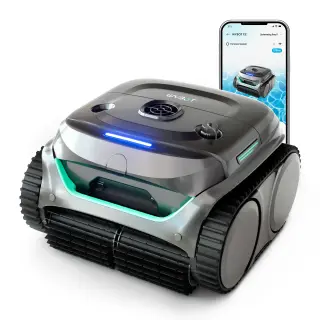 WYBOT C2floor, walls, waterline · 3 hThe WYBOT C2 is a fair entry-level cordless robot for inground pools up to 2,152 sq ft, best bought on sale and from a seller with easy returns.$700 list
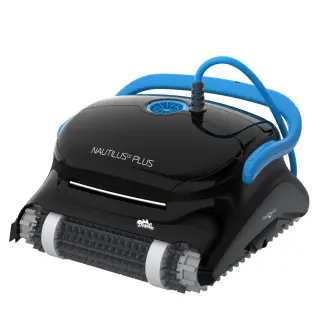 Dolphin Nautilus CC Plus w/ Wi-Fifloor, walls · 120 minPick the Dolphin Nautilus CC Plus Wi-Fi for a scheduled floor-and-wall clean of an inground pool up to 40 ft; skip it if your pool has tricky steps or ledges.$849 list
Read next
- FixAiper Scuba S1 Not Climbing Walls: Causes and FixesAiper Scuba S1 won't climb the walls? Check the mode, the filter basket, the roller brush and the wall-to-floor angle, in that order. When to call Aiper.
- ComparisonAiper vs Dolphin: Cordless Convenience vs Corded Track RecordAiper vs Dolphin: Scuba S1 and X1 vs Nautilus CC Plus and Liberty 600. Charging vs cords, warranties, recalls, owner complaints and Nov 2026 list prices.
- ComparisonBeatbot vs Aiper: Cordless Pool Robots Compared Model by ModelBeatbot vs Aiper, tier by tier: Scuba S1 vs Sora 10, S3 vs Sora 30, V3 vs AquaSense 2, plus skimmers. Runtime, warranty, recalls and Nov 2026 list prices.
- ComparisonBetta SE vs Aiper EcoSurfer S2: Solar Pool Skimmers ComparedBetta SE vs Aiper EcoSurfer S2: solar-only simplicity vs app control and a plug-in backup. Debris tests, sun needs, durability and Nov 2026 list prices.
- ComparisonBetta SE vs Betta SE Plus: Is Dual Charging Worth It?Betta SE vs SE Plus: the Plus adds a 3.5-hour plug-in charge for shady or cloudy pools. What else differs, Nov 2026 list prices and who should pay extra.
More free tools
- Robot mower finderEnter your lawn size, slope and tree cover. Get the US models whose published specs actually fit.
- Slope converterBrands quote slope in percent, degrees or both. Convert between them and see which mowers can climb your hill.
- Five-year cost calculatorRobot mower vs riding mower vs a lawn service over five years, with your own numbers.
- 2027 launch trackerEvery announced 2027 robot mower and pool robot, with what's confirmed and what isn't.