Free tool
Robot Mower Finder: What Size Robot Mower Do You Need?
Tell us about your lawn. We'll show every US robot mower whose published specs cover it, and say why the others don't.
- Pick your lawn size and steepest slope
- Say how many trees shade the lawn
- See every mower that fits, cheapest first
Backyard Bot HQ is reader-supported: we may earn a commission when you buy through links on this site, at no extra cost to you. As an Amazon Associate I earn from qualifying purchases.
The finder takes four things about your lawn (area, steepest slope, tree cover and budget) and lists every robot mower in our database whose published area and slope ratings cover it, cheapest first. Below that it shows close calls: mowers that miss on exactly one thing, with the reason spelled out. It’s built for the question most buyers start with, which is what size robot mower they actually need.
Treat the list as a shortlist: pick a mower rated for at least 20% more area than you mow, and more slope than your steepest spot.
How to use the finder
- Lawn area to mow (acres). Count only the grass, not the house, driveway or beds. A quarter acre is 10,890 sq ft and a full acre is 43,560 sq ft, so divide your square footage by 43,560. The box starts at 0.4.
- Steepest slope (percent). Use the steepest part of the lawn, not the average. If you only have degrees, run them through the slope converter first. The box starts at 35%.
- Tree cover. Pick open sky, some trees, or heavy canopy and tall buildings close by.
- Budget. Enter a list price ceiling in dollars, or leave it blank for no limit.
- Must-haves. “No boundary wire” and “On sale now” start ticked. “Several separate lawns” is there for multi-zone yards.
Results update as you change anything.
How to read the results
The headline tells you how many mowers fit “on paper”. The first eight show right away, with a “Show all” button for the rest. Each one shows its rated area in acres, its rated slope in percent, its navigation type (RTK, network RTK, LiDAR, vision or a mix), and its list price. Some lines carry a bold note:
- “Little headroom on area” means the rating covers your lawn by less than 20%.
- “RTK-only: satellite signal can drop under heavy canopy” appears when you pick heavy canopy and the mower relies on satellite positioning without cameras or LiDAR to fall back on.
- “LiDAR helps under trees” appears for LiDAR models when you pick heavy canopy.
Close calls list up to eight mowers that fail one test, such as “rated for 0.37 ac, you need 0.4” or “over budget by $300”, also cheapest first. A mower that fails two or more tests doesn’t appear at all. If nothing fits, read the close calls: the reasons tell you whether budget, area or slope is the real limit for your yard.
What the finder assumes
Area and slope ratings come from each brand’s own specs. Brands rate area under ideal conditions, which is why the finder flags anything with less than 20% to spare. Slope is a straight comparison: a mower rated for 45% passes a 45% lawn and fails a 46% one.
A few rules aren’t obvious from the form:
- Tree cover never removes a mower. It only adds the canopy notes above, and only when you pick heavy canopy.
- Budget skips mowers with no published US list price. They stay in the list as “Price not announced” and sort to the bottom. Worx, for example, shows no price for its Landroid Vision Cloud models on its own US site.
- Multi-zone only removes mowers whose specs say they can’t do it. Right now no mower in the database is listed that way, so ticking it doesn’t change the list. Some mowers don’t state multi-zone support either way, so confirm it on the model page if you have separate lawns.
- A mower with no published slope rating can’t pass the slope test, so at best it appears as a close call.
- “On sale now” hides models that are announced but not yet selling. Untick it to see what’s coming.
When to double-check the answer
- Area ratings aren’t all measured the same way. Lymow rates the One Plus per day (1.1 acres a day with the 5A charger), and the finder reads that like any other area rating.
- Your steepest spot is at the lawn’s edge. Some brands publish a lower slope limit at the boundary than inside the lawn. The slope converter page explains which.
- A wire model shows up when you didn’t expect it, or vice versa. If a mower appears as a close call for “needs a boundary wire”, open its model page: some mowers support a wire as an option without requiring one.
- Your lawn has narrow side passages or dense trees. Navigation matters more than the spec sheet suggests there. Our RTK vs LiDAR vs vision guide explains which type struggles where.
Questions about sizing
What size robot mower do I need?
One rated for your mowable grass area plus about 20%. For 0.4 acre (17,424 sq ft), look for a rating of about 0.48 acre or more. Brands sell in steps, so the answer is often the next size up. Mammotion’s LUBA 3 AWD comes in 1500 (0.37 acre), 3000 (0.75 acre) and 5000 (1.25 acre) versions, and for a 0.4-acre lawn only the 3000 and 5000 clear it.
Does the finder include mowers that need a boundary wire?
Yes, if you untick “No boundary wire”. With it ticked, mowers listed as using a wire drop out of the main list, and show up as close calls only when the wire is their one miss.
Bottom line
Take your shortlist and price the top two over five years with the robot mower cost calculator, since cellular plans and parts can flip a close race. If you’d rather start from our picks, the wire-free robot mower buying guide ranks them by yard type.
Mowers people check most
All robot mowers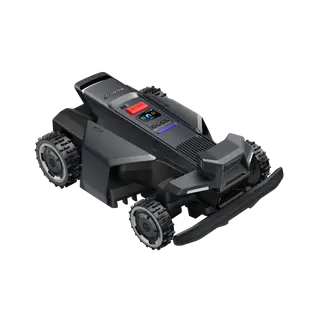 Navimow X4301 ac · 84% (40°) slopeBuy the Navimow X430 for open or hilly lawns from half an acre to an acre; skip it for small yards or deep shade.$2,499 list
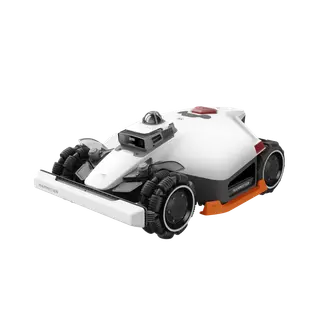 Mammotion LUBA 3 AWD 30000.75 ac · 80% (39°) slopeThe LUBA 3 AWD 3000 is our pick for hilly, multi-zone lawns up to 0.75 acre; flat, open lawns suit the Navimow X430 better.$2,799 list
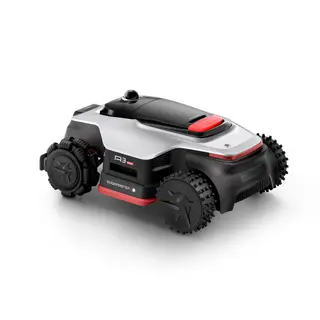 Dreame A3 AWD Pro 35000.87 ac · 80% (39°) slopeBuy the A3 AWD Pro 3500 for sloped, tree-shaded lawns up to 0.87 acre; skip it if your yard is small, flat and open to the sky.$3,200 list
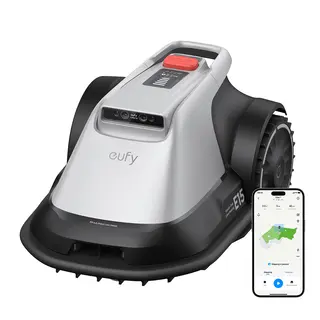 eufy Robot Lawn Mower E150.20 ac · 33% (18°) slopeBuy the eufy E15 only for a flat lawn under 0.2 acre without St. Augustine, and only at a real discount; otherwise the E15 Gen 2 costs the same.$1,800 list
Read next
- Buying guideBest Robot Lawn Mowers Without Perimeter Wire for 2027: Picks by Yard TypeWire-free robot mower picks by yard type: Navimow X430 for open lawns, LUBA 3 AWD for split yards, Dreame A3 AWD Pro under trees. Dated specs and prices.
- FixMammotion LUBA 2 Not Connecting to WiFi: Fixes in OrderLUBA 2 won't join your WiFi? It only uses 2.4 GHz. Fixes in order: stay within 10 ft, split dual-band networks, test a hotspot, reseat the key, or switch to 4G.
- FixMammotion LUBA Not Charging (LUBA 2 and LUBA mini): Step-by-Step FixesLUBA 2 or LUBA mini not charging? What the dock's green and red lights mean, the key reset, cleaning the pads, the 39-113°F charging range and repairs.
- FixNavimow Not Charging: Causes and Fixes by ModelNavimow not charging? Read the dock light first, then clean the strips, level the station, check the cable and temperature. Fixes for X4, i2, H2 and X3.
- GuideRobot Lawn Mower Theft Prevention: PINs, Alarms, Geofences and GPSDo robot mowers get stolen? Yes. How PIN locks, lift alarms, geofences, 4G tracking and Find My compare across Husqvarna, Navimow, Mammotion, Worx and eufy.
- GuideRobot Lawn Mower Winter Storage: Charge Level, Cleaning and Base StationHow to store a robot mower for winter: each brand's charge level (80% to full), top-up intervals, safe temperatures, and what to do with the dock and antenna.
More free tools
- Slope converterBrands quote slope in percent, degrees or both. Convert between them and see which mowers can climb your hill.
- Five-year cost calculatorRobot mower vs riding mower vs a lawn service over five years, with your own numbers.
- Pool robot matchPick your pool type, size and what you need cleaned. See which cordless and corded robots fit.
- 2027 launch trackerEvery announced 2027 robot mower and pool robot, with what's confirmed and what isn't.